




Cosmic
Moderator
-
Joined
-
Last visited
Everything posted by Cosmic
-
Kailan ulit deadline for voting dito? @JiroDavid @LuffyLangMalakas
-
-
13, 26, 39, 52, 65
-
Di ba? Haha. Yan din suggestion ko nun. Yes, we've been working on it.
-
Haha oo. Para madali makita ng iba yung answer and they'd know na completed na yung game.
-
May pattern naman. Haha.
-
ANSWERS: A= 20, B= 20 PATTERN: Load prizes from my 8 Forum Mini Games.
-
CORRECT! ?
-
@Adrean Browse the forum for forum games to win a slot in Netflix Groups, be active in the forum, and follow the rules. Thanks! ?
-
Wrong answers guys. Thanks for joining!? Meron sainyo malapit na sana answers. Sayang.
-
Wrong answer din po. Thanks for joining!
-
Wrong answers. Better luck next time!
-
Once lang po owede sumagot.
-
Wrong answers guys. Thanks for joining!
-
Ang galing di ba. May green trophy ang best answer. Tapos ganito yung question pag meron nang best answer. Merong trophy. Then question mark lang pag wala pa.
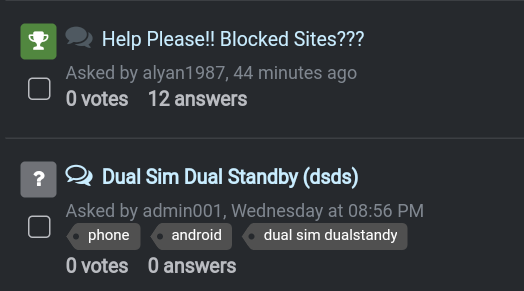 Nasagot na yata. Anyway, ang ganda ng Questions and Answers Section di ba. ? Parang reddit, you can upvote, downvote the answers.Curious ako sa 2. HahahNumber 8 doesnt like me, i see.Tapos na agad. :o18, 28, 38, 48, 68Wow! Thanks for sharing @K4anubhav!Completed na po. Join nalang sa next. Most of our games, pag may winner na, we put (COMPLETED) at the title so less confusion sa members if tapos na or not ang games. ?





