Cosmic
Moderator
-
Joined
-
Last visited
Everything posted by Cosmic
-
Wow! Lucky!
-
Join kayo Game #2 soon! ?
-
Oo, masaya na ako sa isa. Loyal kasi ako LOL WHT
-
Sayang nga haha.
-
YES!
-
Haha oo, nagulat nga ako kahapon nung nagcomment siya, yung word niya walang vowel.
-
WINNER: @paranoia WORD: WRY POINTS: 66
-
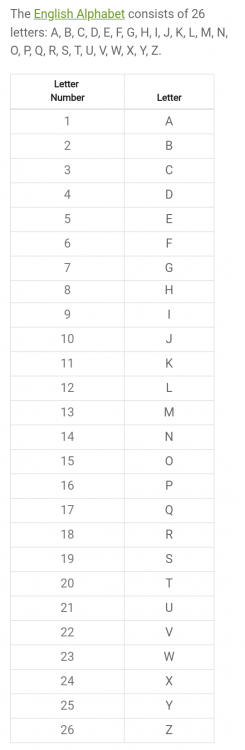
WORDS with POINTS: Recheck your points here:
-
Tapos na po pagbigay ng words. Checking na po ng scores.
-
Disqualified words (0 points):
-
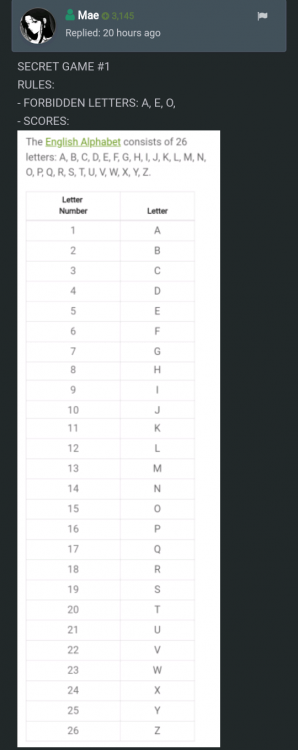
SECRET RULES REVEALED: 1. FORBIDDEN LETTERS: A, E, O (meaning all words with A, E, O gets 0 points/disqualified) 2. SCORES: Each letter has an equivalent point (based on their position in the alphabet, example, Z=26) Member with the highest total score will win. Let's see who won!
-
-
Completed na po yung game.
-
Thank you. Parang gaming forum. ?
-
1, 6, 15, 20, 80
-
Okay lang yan. Galingan mo ulit next games! ?
-
Sayang! Follow your instincts! Hahah
-
Hahah ayan pwede ka na matulog!
-
ANSWER: E PATTERN: 1. Multiple A's every after 2 letters are just extra, remove them all. B, C, A, D, (?), A, H, I , A, K, O, A, X B, C, D, (?), H, I, K, O, X (Now you have a series of letters which are arranged from their position in the alphabet) 2. Check logical pattern, all of them are equivalent to their vertical mirror image. ?
-
Galing magsolve ni @ChooxTv
-
Ang bilis naman masolve ni @ChooxTv! CORRECT!
-
May correct kang ginawa sa process mo, but wrong answer. Thanks for joining! ?
-
Hello. You are still not qualified to join this game. Join next game! ?
-
Game still ongoing (until 5PM only) Drop your word entries if you still havent! ?
-
Good logic. But wrong answer. Better luck next game! ?