



Oranek
Forum Veteran
-
Joined
-
Last visited
Everything posted by Oranek
-
@KuyaDennis sir mas okay pa gamitin ang ublock origin promise di ka magsisisi ??
-
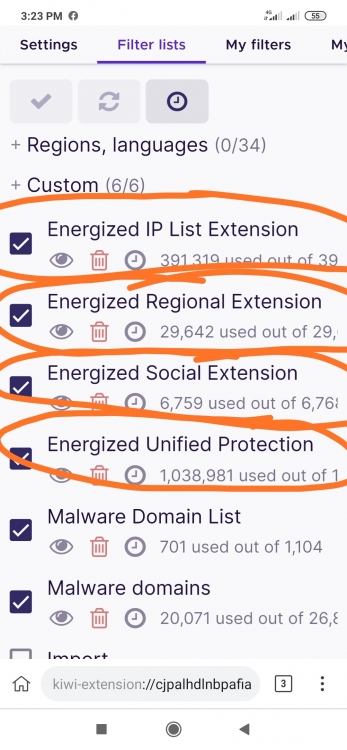
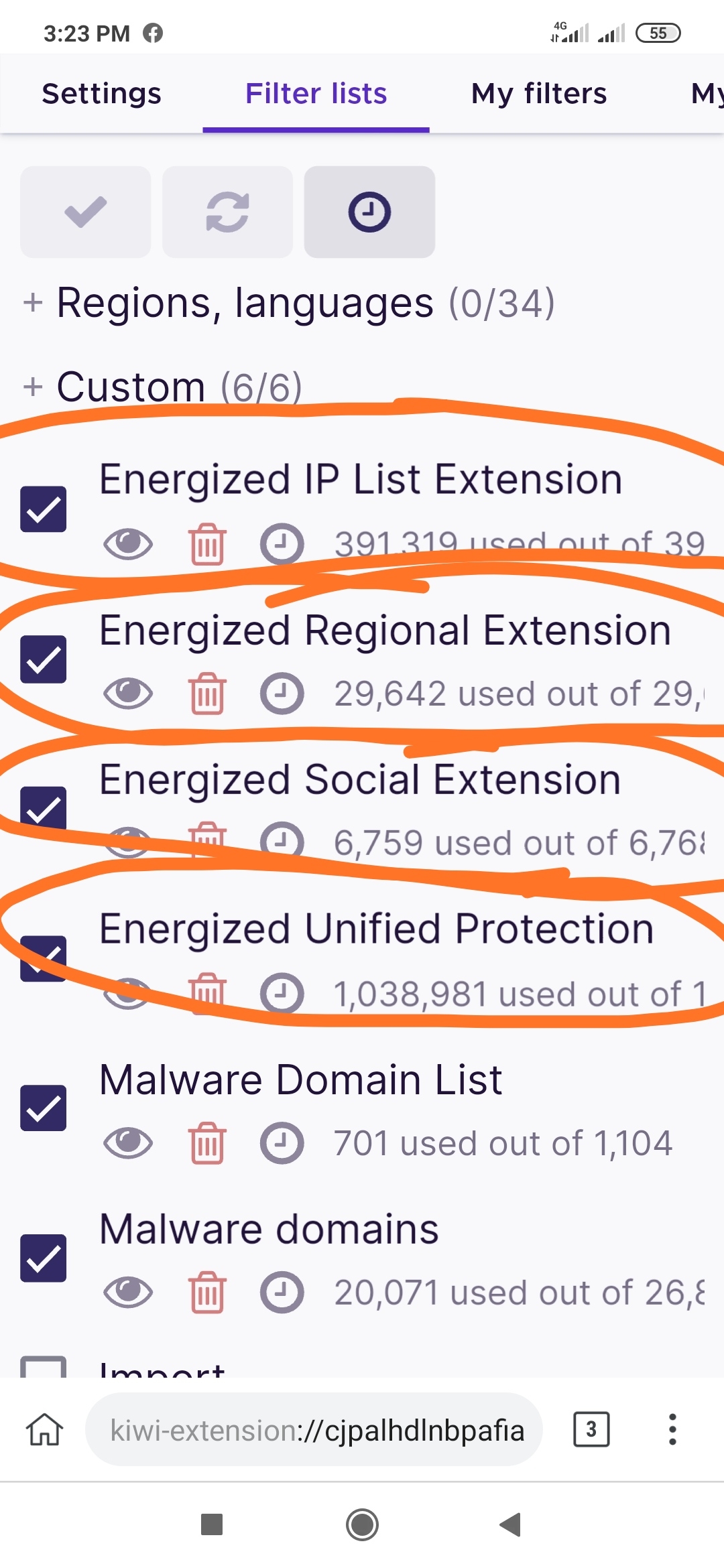
Sir lagyan mo na rin yung Ublock origin ng ganitong filters ?? wag mo nalang isama yung Unified Protection Filter kase Hindi mo ma search ang mga Porn sites kase automatic BLOCK ??
-
ako ba tinatanong mo? @yesyesyo ?
-
Welcome lods ??WELCOME ? PLEASE PA REACT NAMAN SA POST NA TO THEN PA FOLLOW NIYO NA RIN AKO PARA UPDATED KAYO SA MGA POST KOWELCOME ? PLEASE PA REACT NAMAN SA POST NA TO THEN PA FOLLOW NIYO NA RIN AKO PARA UPDATED KAYO SA MGA POST KOMaraming Salamat sa palaro ?MARAMING SALAMAT ?THANKS AND KEEP SHARING LODS ?MARAMING SALAMAT SA PAGBABAHAGI NITO LODS ?Welcome ? PLEASE PA REACT NAMAN SA POST NA TO THEN PA FOLLOW NIYO NA RIN AKO PARA UPDATED KAYO SA MGA POST KO ?Welcome lods ?geh lang lods ??THANKS AND KEEP SHARING LODS ?MARAMING SALAMAT SA PALARO ?Welcome lods ?Welcome lods ? Welcome again mga lods ?






.jpg.fa1e3fed499867cb5e47659305d89a19.jpg)

Account
Navigation
Search
Configure browser push notifications
Chrome (Android)
- Tap the lock icon next to the address bar.
- Tap Permissions → Notifications.
- Adjust your preference.
Chrome (Desktop)
- Click the padlock icon in the address bar.
- Select Site settings.
- Find Notifications and adjust your preference.
Safari (iOS 16.4+)
- Ensure the site is installed via Add to Home Screen.
- Open Settings App → Notifications.
- Find your app name and adjust your preference.
Safari (macOS)
- Go to Safari → Preferences.
- Click the Websites tab.
- Select Notifications in the sidebar.
- Find this website and adjust your preference.
Edge (Android)
- Tap the lock icon next to the address bar.
- Tap Permissions.
- Find Notifications and adjust your preference.
Edge (Desktop)
- Click the padlock icon in the address bar.
- Click Permissions for this site.
- Find Notifications and adjust your preference.
Firefox (Android)
- Go to Settings → Site permissions.
- Tap Notifications.
- Find this site in the list and adjust your preference.
Firefox (Desktop)
- Open Firefox Settings.
- Search for Notifications.
- Find this site in the list and adjust your preference.