




Cosmic
Moderator
-
Joined
-
Last visited
Everything posted by Cosmic
-
Hahaha better luck next game!
-
winner: @Glutoneria
-
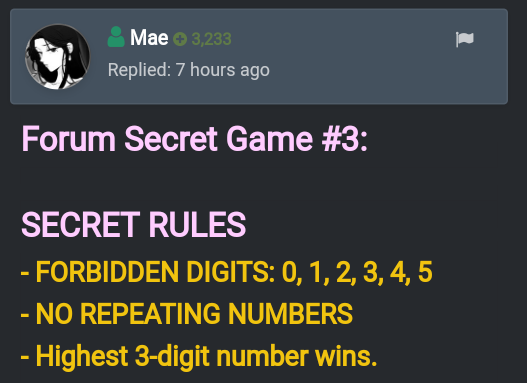
Forum Secret Game #3: SECRET RULES - FORBIDDEN DIGITS: 0, 1, 2, 3, 4, 5 - NO REPEATING NUMBERS - Highest 3-digit number wins. Entries:
-
-
Hello. You are not yet qualified to join this game. You need 30 posts. Stay active and join the future games!?
-
Thanks for joining! Sayang haha. Join next game. ?
-
ALL ARE CORRECT! ? Yung mali ng iba is number 5.
-
Nasagot na yan kanina. Edit mo nalang answer mo. Haha oo pwede yan. 3 digits naman.
-
Okay thanks!
-
Hello. You are still not yet qualified to join this game. You need 30 posts to join. Join next time but no spamming!
-
May sumagot na nyan. Edit niyo nalang comments niyo.
-
Third option. Let's all get stuck in the quarter-life crisis. Haha joke. I think the body and mind combination is at it's prime between 20 to 30 years of age.Haha join ka nalang sa next game. Magpost na ako todayUp natin para makita ng iba. Tag ko rin ibang members, they might be able to help. Hehe. @taym3 @yesyesyo @dennis99 @JiroDavid @chawdog @JPCuteAngelThanks for sharing @BadBoy2Chocolate ice cream. ? ?Talo ulit. HahahaTapos na po yung game.Yes naman. Correct. Count your blessings! ?Hahaha. Join kayo next game! ?Close ko na po ang thread.Ayan na nga ba sinasabi ko eh. Hahaha.





