




K4anubhav
Special Member
-
Joined
Everything posted by K4anubhav
-
Juliet cat London bungee jumping 25 Raymond turtle Paris swimming 26 Jake goldfish Rome ice skating 27 Harold parrot Barcelona zip lining 28 Lea hamster Iceland trekking 29
-
still studying in lockdown
-
I think u can only use by adb but it need a pc
-
this time its more hard as there is no clues for individuals identification
-
This Time I will read the rules first ?
-
Thanks but now i am able to get out of login loop
-
I founded a way to get out of login loop now i don't need ssh commands
-
hope someone can help; although i have a ssh command to add user but the problem is- I want that user don't have to enter the password every time when they want to connect
-
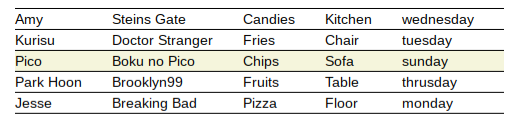
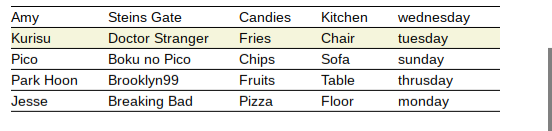
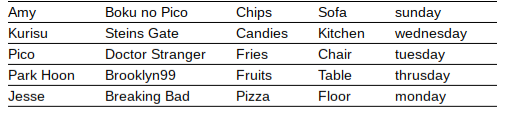
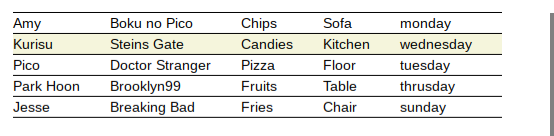
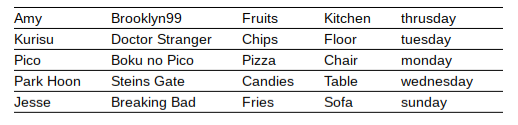
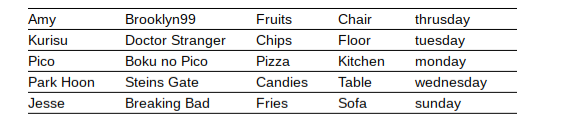
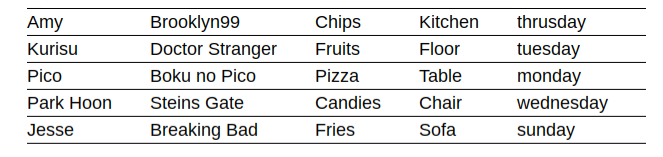
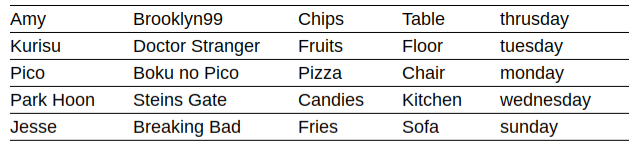
I know its targeted towards mePark Hoon Brooklyn99 Fruits Table thrusday Pico Boku no Pico Chips Sofa sunday Amy Steins Gate Candies Kitchen wednesday Jesse Breaking Bad Pizza Floor monday Kurisu Doctor Stranger Fries Chair tuesdaystill getting the same answer even retry from starting





Account
Navigation
Search
Configure browser push notifications
Chrome (Android)
- Tap the lock icon next to the address bar.
- Tap Permissions → Notifications.
- Adjust your preference.
Chrome (Desktop)
- Click the padlock icon in the address bar.
- Select Site settings.
- Find Notifications and adjust your preference.
Safari (iOS 16.4+)
- Ensure the site is installed via Add to Home Screen.
- Open Settings App → Notifications.
- Find your app name and adjust your preference.
Safari (macOS)
- Go to Safari → Preferences.
- Click the Websites tab.
- Select Notifications in the sidebar.
- Find this website and adjust your preference.
Edge (Android)
- Tap the lock icon next to the address bar.
- Tap Permissions.
- Find Notifications and adjust your preference.
Edge (Desktop)
- Click the padlock icon in the address bar.
- Click Permissions for this site.
- Find Notifications and adjust your preference.
Firefox (Android)
- Go to Settings → Site permissions.
- Tap Notifications.
- Find this site in the list and adjust your preference.
Firefox (Desktop)
- Open Firefox Settings.
- Search for Notifications.
- Find this site in the list and adjust your preference.