
Skip to content
View in the app

A better way to browse. Learn more.

BenLotus

A full-screen app on your home screen with push notifications, badges and more.

To install this app on iOS and iPadOS
  1. Tap the Share icon in Safari
  2. Scroll the menu and tap Add to Home Screen.
  3. Tap Add in the top-right corner.
To install this app on Android
  1. Tap the 3-dot menu (⋮) in the top-right corner of the browser.
  2. Tap Add to Home screen or Install app.
  3. Confirm by tapping Install.

DrStrange

Special Member
  • Joined

  • Last visited

Everything posted by DrStrange

  1. Try hehehe Luffy: 28 y/o, October 31st, 9:00 am Mae: 31 y/o, May 11th, 2:00 pm Jinwoo: 30 y/o, February 29th, 6:00 am Analou: 29 y/o, August 15th, 7:00 pm Travis: 32 y/o, June 9th, 5:00 pm
  2. 18 na po ako ahahaha
  3. Ayy Sayang di ko naabutan.. busy kasi Netflix eh ahhahaah
  4. Yess!! Oo, inedit ko dahil mali natype ko, instead of saan, daan ang natype..
  5. Question 2: Dahil nakapunta agad si analou sa crime scene nang Hindi sinabi Kung saan Ang crime scene.
  6. Ang ganda ng pa games mo ma'am @Maegan24!!
  7. Ahahaha. Wala po sir. Ginamit ko Lang papel at lapis.
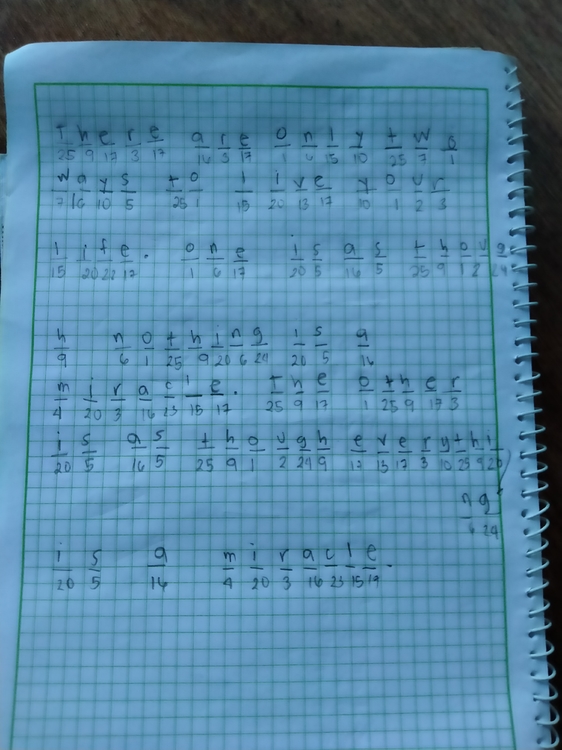
  8. Answer ko po: There are only two ways to live your life. One is as though nothing is a miracle. The other is as though everything is a miracle.
  9. Sir @JiroDavid, nandito napo ako Ahahahh
  10. May Yousician premium ba kayo?
  11. Hala.. sana makasagot ako, daming mga expert basta Logic eh... ?

Account

Navigation

Search

Search

Configure browser push notifications

Chrome (Android)
  1. Tap the lock icon next to the address bar.
  2. Tap Permissions → Notifications.
  3. Adjust your preference.
Chrome (Desktop)
  1. Click the padlock icon in the address bar.
  2. Select Site settings.
  3. Find Notifications and adjust your preference.