Skip to content
View in the app

A better way to browse. Learn more.

BenLotus

A full-screen app on your home screen with push notifications, badges and more.

To install this app on iOS and iPadOS
  1. Tap the Share icon in Safari
  2. Scroll the menu and tap Add to Home Screen.
  3. Tap Add in the top-right corner.
To install this app on Android
  1. Tap the 3-dot menu (⋮) in the top-right corner of the browser.
  2. Tap Add to Home screen or Install app.
  3. Confirm by tapping Install.

Lilac

Special Member
  • Joined

  • Last visited

Everything posted by Lilac

  1. Pa-try nga nito, thanks
  2. Lilac replied to Dondon's topic in Gags and Jokes
    Potassium daw hehe
  3. Waaaah yun pala yon hahahaha
  4. EDM, effective sakin
  5. Ano 'yan
  6. Nakaredeem ka na lods?
  7. YOUR WELCOME! Ayan nagawa mo na.
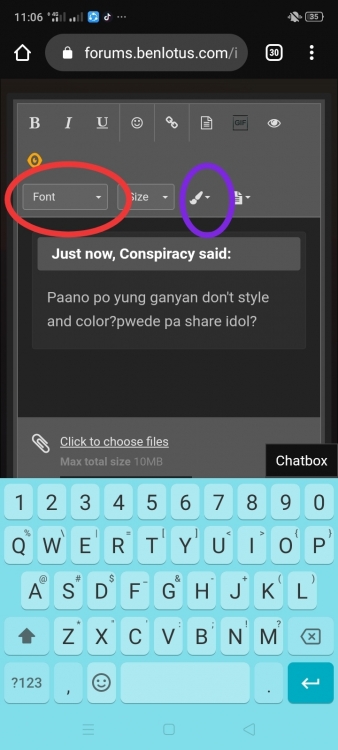
  8. Ayan lods, pindutin mo lang yung naka-bilog sa pic, pwede mo na ichange yung font at color mo
  9. Lilac replied to Ardie's topic in New Members Introduction
    Warm welcome! ?
  10. Welcome sa BenLotus! Enjoy! Mababait members dito ??
  11. Wow, visit ko rin 'to. Thanks!
  12. Congrats! Swerte unang comment ?
  13. Nice! Thank you!
  14. For future reference! Salamat po!
  15. Thank youuu!
  16. Tambay ng BenLotus Nood ng movies, tv series, anime Basa ng Novels Study pag may time
  17. Patingin boss, salamat

Account

Navigation

Search

Search

Configure browser push notifications

Chrome (Android)
  1. Tap the lock icon next to the address bar.
  2. Tap Permissions → Notifications.
  3. Adjust your preference.
Chrome (Desktop)
  1. Click the padlock icon in the address bar.
  2. Select Site settings.
  3. Find Notifications and adjust your preference.