




JiroDavid
Moderator
-
Joined
-
Last visited
Everything posted by JiroDavid
-
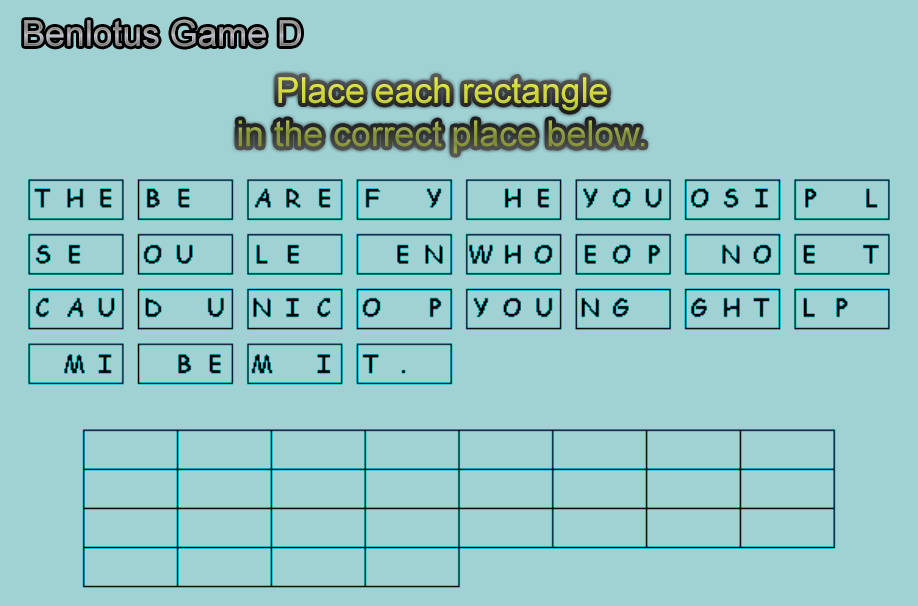
Install pa kami maraming themes para maraming choice hahah.May light theme pa pag Moderator or Admin.Pwede din ibang themes. kaso mabagal sa chrome, mabilis sa firefox.Madali lang yung fix. 1. Turn BenLotus Offline. 2. Recheck all Files. 3. Clear Server Cache. 4. Turn BenLotus back online. 15 mins haha.Di nga ako makatulog Sa kakatest ng Site Sa phone. Hehe.Sige add ka namin ngayon hahahaha.Maximus - Admin, the one who created this forums, hindi siya active dito pero marami siyang alam sa technical ng forums. JiroDavid - - Admin - Game Runner Maegan24 - Admin - Game Runner Maks - Moderator - Game Runner LuffyLangMalakas - Moderator Heisenberg - Moderator JunePaulKing2019 - Security GuardIto ang nakasulat sa topic, hindi ako nag post haha, si June nag post. Hello Mga Taga PH Corner na mababait. Alam namin na mahirap mag hanap ng Netflix dito, dahil maraming nagpapalit ng password at pasaway. Marami na ding testimonials dito na never pa sila nakalipas ng kahit isang araw sa netflix account dito. Alam kong bawal i-post dito ang gagawin ko ngayon, pero tumutulong lang ako. Kahit ma banned pa ako dito ok lang basta may maitulong. Hindi kami naghahanap ng maraming members para sa community namin, pero tumutulong lang kami. Walang ads sa community namin, dahil hindi kami kumikita galing sa ads. 100% kaming tumutulong unconditional, ang gusto lang namin na masaya ang mga taong naghihirap na dahil sa ECQ. Kaya gusto kong i-share sa inyo ang fourms na ito (lotusph.com) Dito kapag sign up palang, may netflix agad. Basta sumunod lang kayo sa rules doon, siguradong may Netflix kayo. Alam kong ma-remove ang topic na ito mamaya, kaya kung sino ang lucky sa inyo, punta na kayo doon. Hindi ko sinasabi na iwanan mo ang PH Corner, ang sinasabi ko lang na pwede ka magkanetflix ng madali sa amin.haha, Verifying accounts, making netflix, setting up profiles, replying to topic, answering to pm. haha dami non, the truth is, ito ginawa ko Verifying, adding to slot, and replying to PM, kasi yung making netflix isang account for 5 members na yun. Hindi ko man lang napansin na busy na busy ang mga topics, haha.Si Maximus ang kapatid ko dito sa Forums sige lang tanong lang haha.Sayang @KTH May Na una sayo haha bukas ulit.Hahaha Grabe ang bilis mo. Pwede ba makita yung paper Na gamit mo? winner ka na Pero bukas pa ang prize.Pwede makita yung paper Na gamit moTama sagot mo Pero bukas pa ako mag bigay ng prize. congrats! anong first letter Na guess mo?Anong letter una nakuha mo hahahaAno ba Yan panalo ka na. Bukas na Ang prize ha kakatag mo Lang ako taposo agad. Anong cheat device gamit mo haha Hindi ka na eligible sa game b at c dahil winner ka na sa game AHaha sige solve mo na. Si @KTH magaling Yan eh. Bilis nya last time.Si @jesuisMoi nasaan na kaya? Ito ang pang excercise para sa competition eh kahit hindi naman ganitong type hahaha.Meron pang Game B at Game C, sinabay ko nahehe... guest guess lang first step dapat pansinin kung anong letter ang repeated lahat, tapos plug and play, like ano kaya letter A? tapos check lang






Account
Navigation
Search
Configure browser push notifications
Chrome (Android)
- Tap the lock icon next to the address bar.
- Tap Permissions → Notifications.
- Adjust your preference.
Chrome (Desktop)
- Click the padlock icon in the address bar.
- Select Site settings.
- Find Notifications and adjust your preference.
Safari (iOS 16.4+)
- Ensure the site is installed via Add to Home Screen.
- Open Settings App → Notifications.
- Find your app name and adjust your preference.
Safari (macOS)
- Go to Safari → Preferences.
- Click the Websites tab.
- Select Notifications in the sidebar.
- Find this website and adjust your preference.
Edge (Android)
- Tap the lock icon next to the address bar.
- Tap Permissions.
- Find Notifications and adjust your preference.
Edge (Desktop)
- Click the padlock icon in the address bar.
- Click Permissions for this site.
- Find Notifications and adjust your preference.
Firefox (Android)
- Go to Settings → Site permissions.
- Tap Notifications.
- Find this site in the list and adjust your preference.
Firefox (Desktop)
- Open Firefox Settings.
- Search for Notifications.
- Find this site in the list and adjust your preference.