



-KHAN-
MovieBox Uploader
-
Joined
-
Last visited
Everything posted by -KHAN-
-
Thanks. Let me see it I know it. It's so tough to gather 20$ in this app. After 10 days, I hardly got 0.5$
-
Thanks. How many days it took for you to reach 20$ ? What did you do after installing the app to earn faster? @HIRAN
-
Use Rufus software
-
Not for me lol?
-
Let me have a look. Thank you
-
With same Facebook account? New lazybucks account approved?
-
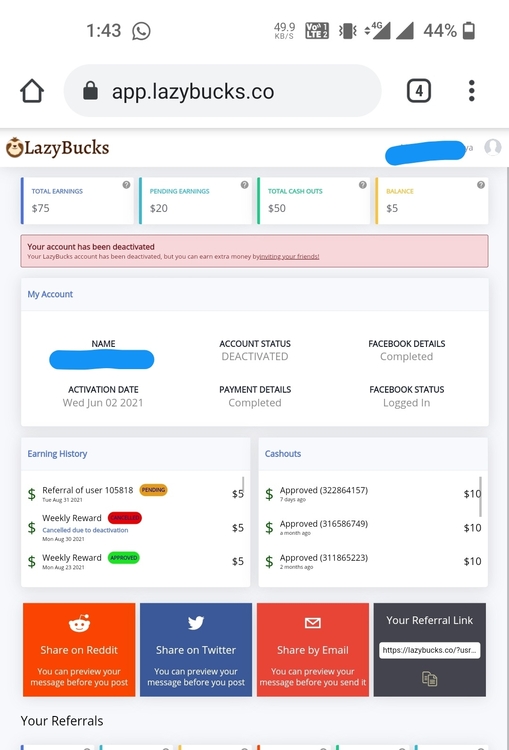
Same . My lazybucks also deactivated now . They don't follow FB ads policy and later identity confirmation requires. Then automatically they just deactivate our account.
-
India
-
thanks @Cosmic. I donot have interesting topics from june though
-
Thanks . having a look at it
-
-
-
-
Pasilip po. Thanks



Account
Navigation
Search
Configure browser push notifications
Chrome (Android)
- Tap the lock icon next to the address bar.
- Tap Permissions → Notifications.
- Adjust your preference.
Chrome (Desktop)
- Click the padlock icon in the address bar.
- Select Site settings.
- Find Notifications and adjust your preference.
Safari (iOS 16.4+)
- Ensure the site is installed via Add to Home Screen.
- Open Settings App → Notifications.
- Find your app name and adjust your preference.
Safari (macOS)
- Go to Safari → Preferences.
- Click the Websites tab.
- Select Notifications in the sidebar.
- Find this website and adjust your preference.
Edge (Android)
- Tap the lock icon next to the address bar.
- Tap Permissions.
- Find Notifications and adjust your preference.
Edge (Desktop)
- Click the padlock icon in the address bar.
- Click Permissions for this site.
- Find Notifications and adjust your preference.
Firefox (Android)
- Go to Settings → Site permissions.
- Tap Notifications.
- Find this site in the list and adjust your preference.
Firefox (Desktop)
- Open Firefox Settings.
- Search for Notifications.
- Find this site in the list and adjust your preference.