




JiroDavid
Moderator
-
Joined
-
Last visited
Everything posted by JiroDavid
-
Congrats Seiya.. Also check the last lottery, you may have won, there are still no winners. @SeiyaStarLight
-
Hala, sino ba dapat manalo dito? check ko nga, kasi bumili ako 5 ticket.
-
Si @JPCute professional yan. Sya po ang isang nag drawing sa Marvel comics noon ang pagkaalala ko
-
Pa choose ng Best Answer, yung kay Tracer. thanks.
-
para kay “Mark” daw. May account naman si Mark dito. Hahaha.
-
Yung mga gusto bumili ng netflix solo, bili nalang kayo mobile plan for 149 tapos pa upgrade nyo nlng for 20 Pesos. So total maging 169 Na ang solo nyo.
-
Yes po, always pwede mag convert BCash to GCash kay @BCashShop
-
Gamit mo app pang combine?
-
Success number 2
-
hahha Na dedemonyo pa rin ang kamay ko ilang beses dahil sa Pag test ko kanina kaya inulit ko yung video.
-
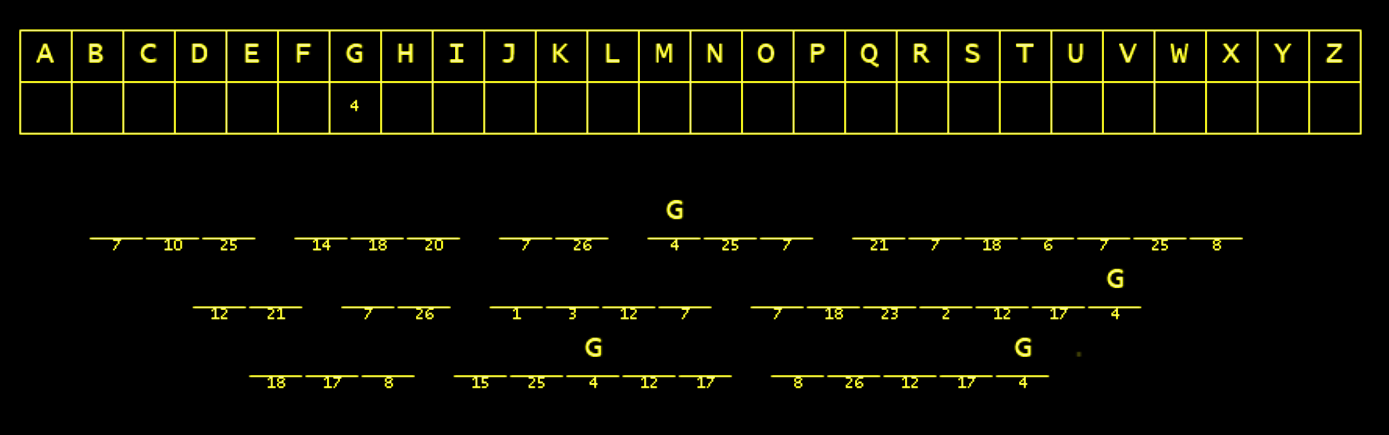
Last winner: @Kyo Grabe, puro casino players ata nanalo.New Winner: @Luna 1 More Slot left.We have a new winner: @Avocado 2 More slot leftBoth correct, but Happy answered first. thanks for joining. @Happy won.May tatlong space pa Dahil dalawa na ang winnersWinner!Winner so far... @Tzuyu @YunBihahaha wala pa nga.Try mo na At may work ka pala mamaya. Tapos na subNakita ko sa status, nagreread na sila una pa sayo.kahit walang clue, marami pa rin makasagot maraming beses na ako nag pa games na ganito haha.






Account
Navigation
Search
Configure browser push notifications
Chrome (Android)
- Tap the lock icon next to the address bar.
- Tap Permissions → Notifications.
- Adjust your preference.
Chrome (Desktop)
- Click the padlock icon in the address bar.
- Select Site settings.
- Find Notifications and adjust your preference.
Safari (iOS 16.4+)
- Ensure the site is installed via Add to Home Screen.
- Open Settings App → Notifications.
- Find your app name and adjust your preference.
Safari (macOS)
- Go to Safari → Preferences.
- Click the Websites tab.
- Select Notifications in the sidebar.
- Find this website and adjust your preference.
Edge (Android)
- Tap the lock icon next to the address bar.
- Tap Permissions.
- Find Notifications and adjust your preference.
Edge (Desktop)
- Click the padlock icon in the address bar.
- Click Permissions for this site.
- Find Notifications and adjust your preference.
Firefox (Android)
- Go to Settings → Site permissions.
- Tap Notifications.
- Find this site in the list and adjust your preference.
Firefox (Desktop)
- Open Firefox Settings.
- Search for Notifications.
- Find this site in the list and adjust your preference.