




Maks
Elite Member
-
Joined
-
Last visited
Everything posted by Maks
-
-
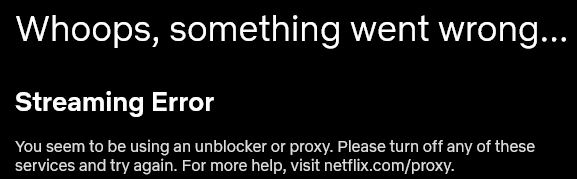
eto po yun sabi ng netflix oh
-
-
-
Nakakapanuod po ako ng ibang movies sa netflix except sa mga movies ata from japan lang pwede opo, nahuli nga ng netflix. May nakakaalam po ba dito para di mahuli na gumagamit ng vpn?Welcome po sa inyo <3Naghanap ako ng link lol ayusin po please ayos sana toAyos to, maitry nga. Salamat poAyos to, salamat po <3Karamihan po ata ng mga members dito ay from symbianizeAyos po kung ganunWow! Congats ulitNgeee sayang naman po pala kung ipapamigay mo langCongats @YumekoCongrats po sa nanaloAyos lang yan, sulit naman ang premyoNakakalungkot naman po kung magcloclose ng ang symbianize, mabuti may bagong forum na agad tulad nitoTama kapo, mahirap ngaPwede din po ba makahingi ng clue?Only one wiiner will be chosen pero malay natin may iba pa kaming maiisip na sagot. Abangan natinPaano po kapag pareho yun sagot namin sa naunang sumagot? at naging tama, makakatanggap parin po ba kami ng premyo? ehh naunahan kasi hays


Account
Navigation
Search
Configure browser push notifications
Chrome (Android)
- Tap the lock icon next to the address bar.
- Tap Permissions → Notifications.
- Adjust your preference.
Chrome (Desktop)
- Click the padlock icon in the address bar.
- Select Site settings.
- Find Notifications and adjust your preference.
Safari (iOS 16.4+)
- Ensure the site is installed via Add to Home Screen.
- Open Settings App → Notifications.
- Find your app name and adjust your preference.
Safari (macOS)
- Go to Safari → Preferences.
- Click the Websites tab.
- Select Notifications in the sidebar.
- Find this website and adjust your preference.
Edge (Android)
- Tap the lock icon next to the address bar.
- Tap Permissions.
- Find Notifications and adjust your preference.
Edge (Desktop)
- Click the padlock icon in the address bar.
- Click Permissions for this site.
- Find Notifications and adjust your preference.
Firefox (Android)
- Go to Settings → Site permissions.
- Tap Notifications.
- Find this site in the list and adjust your preference.
Firefox (Desktop)
- Open Firefox Settings.
- Search for Notifications.
- Find this site in the list and adjust your preference.