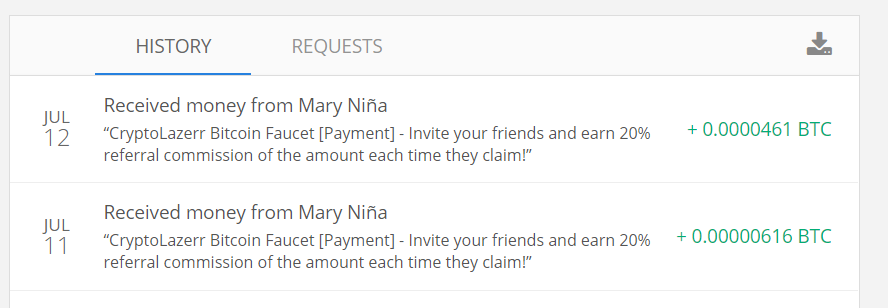
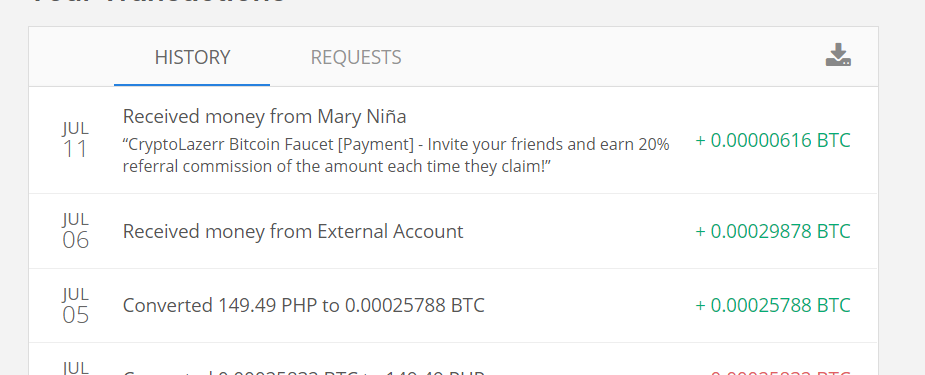
-
EARN EXTRA FROM BRAVE BROWSER
umay brave ko wala akong nakukuha
-
Easy bitcoin fast withdraw using coins.ph
-
Easy bitcoin fast withdraw using coins.ph
- use brave browser for PC/Mobile para sa Shortlinks to avoid ads
-
Easy bitcoin fast withdraw using coins.ph
- no minimum withdrawal pla to btw.
-
2captcha Earn by solving captcha
legit yung mga ganito
-
Easy bitcoin fast withdraw using coins.ph
- Turuan kita kumita gamit ang CoinsPh ?
pa silip thanks 4 sharing- Make Money On Mining PH
pa try mabagal sa honeygain e try ko nmn ung iba- Lifetime hosting Unlimited Diskspace Free domains
up need ko to ngayon salamats- How to create Zoom unlimited minutes
more good feedback please?- Edu Mail Generator
- xGuardianxOnline | SEASON 16 | EXP: x500 | Unique Reset System | 100% Play2Win
- [PHP Scripts] HRM v3.1.6 – Human Resource Management
pa sipsip- ❇️ Web Hack Tool Links
pa silip- Learn Game Design and Dev – Free - Manticore
totoo free ? - Turuan kita kumita gamit ang CoinsPh ?
spolee
BenLotus Member
-
Joined
-
Last visited
Account
Navigation
Search
Configure browser push notifications
Chrome (Android)
- Tap the lock icon next to the address bar.
- Tap Permissions → Notifications.
- Adjust your preference.
Chrome (Desktop)
- Click the padlock icon in the address bar.
- Select Site settings.
- Find Notifications and adjust your preference.
Safari (iOS 16.4+)
- Ensure the site is installed via Add to Home Screen.
- Open Settings App → Notifications.
- Find your app name and adjust your preference.
Safari (macOS)
- Go to Safari → Preferences.
- Click the Websites tab.
- Select Notifications in the sidebar.
- Find this website and adjust your preference.
Edge (Android)
- Tap the lock icon next to the address bar.
- Tap Permissions.
- Find Notifications and adjust your preference.
Edge (Desktop)
- Click the padlock icon in the address bar.
- Click Permissions for this site.
- Find Notifications and adjust your preference.
Firefox (Android)
- Go to Settings → Site permissions.
- Tap Notifications.
- Find this site in the list and adjust your preference.
Firefox (Desktop)
- Open Firefox Settings.
- Search for Notifications.
- Find this site in the list and adjust your preference.