Skip to content
View in the app

A better way to browse. Learn more.

BenLotus

A full-screen app on your home screen with push notifications, badges and more.

To install this app on iOS and iPadOS
  1. Tap the Share icon in Safari
  2. Scroll the menu and tap Add to Home Screen.
  3. Tap Add in the top-right corner.
To install this app on Android
  1. Tap the 3-dot menu (⋮) in the top-right corner of the browser.
  2. Tap Add to Home screen or Install app.
  3. Confirm by tapping Install.

JollyRoger98

BenLotus Member
  • Joined

  • Last visited

  1. Di naman laggy si Brave. Nakaka 5+ tabs nga ako. Baka sa specs mo.
  2. Minimum 25 BAT pala para maka withdraw. At my rate, it would take me more than 3 months para maka 25 BAT. ? ?
  3. Kakastart ko pa lang po last Monday, at ang rule po sa brave browser ay claiming of rewards is after a month. I'll update po after a month kung maka-claim ako. ? So far, maganda naman UI nang Brave and mas smooth sya kesa sa Chrome. ?
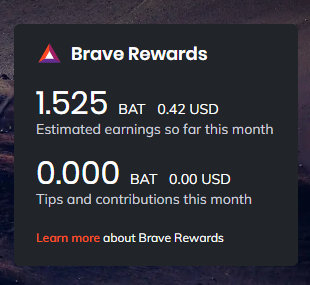
  4. So far nag start ako last Monday, in a matter of 6 days naka .42 dollar pa lang ako. At this rate, lets say a day is .07, so 30 days * .07 = 2.10 dollars O katumbas nang 102 pesos per month. HAHA wiw ?
Account

Navigation

Search

Search

Configure browser push notifications

Chrome (Android)
  1. Tap the lock icon next to the address bar.
  2. Tap Permissions → Notifications.
  3. Adjust your preference.
Chrome (Desktop)
  1. Click the padlock icon in the address bar.
  2. Select Site settings.
  3. Find Notifications and adjust your preference.

