Skip to content
View in the app

A better way to browse. Learn more.

BenLotus

A full-screen app on your home screen with push notifications, badges and more.

To install this app on iOS and iPadOS
  1. Tap the Share icon in Safari
  2. Scroll the menu and tap Add to Home Screen.
  3. Tap Add in the top-right corner.
To install this app on Android
  1. Tap the 3-dot menu (⋮) in the top-right corner of the browser.
  2. Tap Add to Home screen or Install app.
  3. Confirm by tapping Install.

I'm Nesar Ahmed, From Bangladesh

Featured Replies

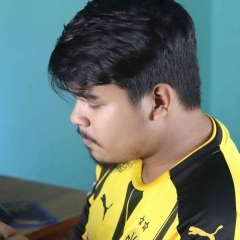
I am Nesar Ahmed, an ordinary person. Born & brought up in a middle-class Muslim family at Dhaka, Bangladesh. But My hometown is Cumilla, Bangladesh. I had only one school, Ali Ahmed School and College. After school life, I studied at Government Science College. Currently, I'm studying computer science and engineering at Daffodil International University. I believe that my strong point is technology. So I choose computer engineering as my career. Moreover, I love to solve problems, so at the moment I am doing competitive programming regularly. Hopefully, I can do better in this field.

Ohh glad to know your hobbies. I hope you enjoy your stay here in the forum! We're friendly here. Just always abide by the rules. Glad to have you here.

Hi Nesar Ahmed, welcome to benlotus. Have a nice day! ^___^ 

Create an account or sign in to comment

Account

Navigation

Search

Search

Configure browser push notifications

Chrome (Android)
  1. Tap the lock icon next to the address bar.
  2. Tap Permissions → Notifications.
  3. Adjust your preference.
Chrome (Desktop)
  1. Click the padlock icon in the address bar.
  2. Select Site settings.
  3. Find Notifications and adjust your preference.